11 May 2009

Tibanga River Pool

I spent my weekend with my family at Tibanga River Pool, San Isidro, Davao Oriental. It was such a great week end to spend time with nature. It is located at Sitio Panganan, Barangay Maputi. It is about 15 kilometers away from the poblacion of San Isidro. I enjoyed swimming and the coolness of the water.


Read more...

07 May 2009

How to manage the compatibility issues of Office 2007 to earlier office versions?

By default all Microsoft Office 2007 applications use the different files extensions than the earlier versions. All earlier Office applications used the file extensions as .doc, .xls and .ppt for Word, Excel and PowerPoint respectively, but now Office 2007 applications uses the .docx, xlsx and .pptx file extensions for Word, Excel and PowerPoint respectively. These all new file extensions are not compatible with all previous versions of Office applications, that is why Office 2002 and Office 2003 applications cannot open and read the .docx, xlsx and .pptx file extensions.

However, you have an option in Office 2007 to save the files with in older files extensions, But if you are frequently using the older versions of the file and also if the files created by you are to be shared on other computers which have earlier versions of Office, you may want to save all your new documents in the older format, but that would create duplicate files.

There is better option in Office 2007 applications to change the default saving file format to the older format and then the new file format in Office 2007 will be changed to .doc, .xls and .ppt for Word, Excel and PowerPoint respectively.

Follow the given steps to set the default older file format for Word 2007:

First click on Start button, go to Program then click on Microsoft Word 2007 to run the word application.

Now click on File menu in the top left corner then click on Word Options button to change the default word options.

In the left side panel, click on Save option, and now "Customized how documents are saved" option will appear in right side panel.

Here find the "Save File in this format" option and click on drop down box to select the different format. Now you will find many options here, select the Word 97-2003 Document (*doc) option.
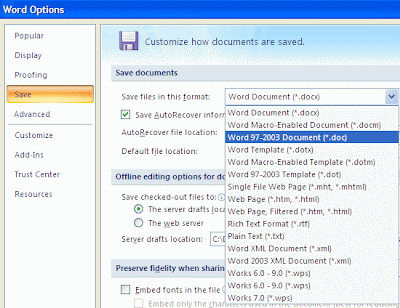
Now click on Ok button to save the settings and all new Word files will be created in the format you set as default.

Read more...

05 May 2009

Lupon Vocational HS Website Nominated as SSP Website of the Month


Every month, a school website hosted by the Smart Schools Program will be named “SSP Website of the Month” and will be featured in the SSP website.

The “SSP Website of the Month” Competition is the Smart Schools Program (SSP) website’s rewards and recognition program for the SSP-hosted websites.

The competition is open to all SSP partner high schools with official school website hosted by SSP. The school website must be owned, developed, and maintained by the school.

Lupon Vocational High School is one of the schools nominated websites for the month of April. Please vote at this link.

Read more...

How to set security on your Recycle Bin Properties?

It is very useful to manage the security of Recycle Bin properties because by default everyone can change the recycle bin settings using windows default rights. If you want to restrict your users to modify these settings, simply edit the "Permissions for BitBucket" and set the read only rights for all users. Using windows registry editor you can set the Recycle Bin rights for all user.

The best technique to edit the windows registry, always backup the whole windows registry keys on backup drive before editing. Because any mistake in Registry can cause serious problem in your computer to run properly.

Follow the given steps to edit computer registry for Recycle Bin properties:

To enable this feature, you will need to be logged into your computer with administrative rights.
First click on Start button then type Regedit in Run option.
Here locate the location to:
HKEY_LOCAL_MACHINE\SOFTWARE\Microsoft\Windows\CurrentVersion\ Explorer\BitBucket
Here in left side panel, right click on "BitBucket" keys and click on Permissions option
Now "Permissions for Bitbucket" dialog box will appear to manage the user's rights.

Here select the user name or group "Everyone" from the list under the "Group or user names" category and then allow read only permissions for selected user under the "Permissions for everyone" section.

Now click on Apply button to save these settings and again click on Ok button to finish the process.

Close the registry editor and restart your computer after any changes to go into effect.

To verify these sittings, simply right click on Recycle bin and go to "Properties" dialog box and any changes here will give you a message "You do not have permission to modify the settings for the Recycle Bin".

Read more...

04 May 2009

I Made It!

I finally got my National Certificiation Level II in PC Hardware Servicing last April 30, 2009 after a 5-day training at Tagum National Trade School, Tagum City together with the Top 3 Regional ICT Tech-voc High Schools. There were 5 components to perform to be able to pass the certification namely PC Assembly/Disassembly, OS Installation, Identification of Computer Parts, Crimping, and File and Printer Sharing.


Read more...

  © Free Blogger Templates 'Greenery' by Ourblogtemplates.com 2008

Back to TOP